Meeting notes in Teams are supposed to reduce the familiar post-meeting question: “What did we actually decide?” In practice, notes can end up in a meeting chat, an email thread, a Word document, or someone’s private notebook. The tool is rarely the main problem. The real issue is that nobody has agreed where the useful information belongs or what “done” looks like.
I have tested enough documentation systems to know that a complicated meeting template usually lasts about two weeks. Then a client call runs long, a child needs a ride, or someone joins from a phone with 4 percent battery. A workable system needs to capture decisions quickly, make ownership visible, and remain understandable to someone who missed the meeting. That is the standard I use for meeting notes in Teams.
What meeting notes in Teams should contain
Good notes are not a transcript. They are a compact record of the conversation’s useful output. For most recurring meetings, that means the date, attendees, purpose, decisions, open questions, action items, and the next review point. You do not need to document every sentence about a software launch or budget discussion. You need enough context for a person to understand what changed and what happens next.
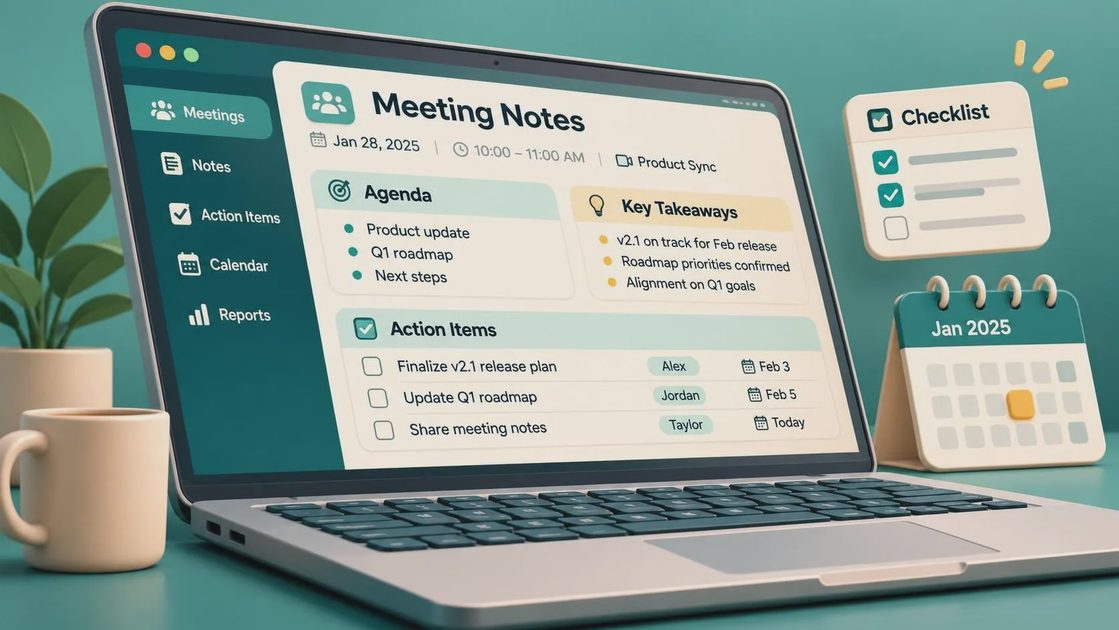
A useful action item includes an owner and a date. “Review the onboarding flow” is a reminder disguised as a task. “Jordan will review the onboarding flow and post three suggested changes by Thursday” is actionable. If the deadline is genuinely unknown, write “owner to confirm timing” rather than inventing a date that will quietly become misleading.
The best meeting notes in Teams also separate decisions from discussion. A long conversation about pricing might produce one decision, two risks, and one unanswered question. Those categories help readers scan the page later, especially when they are looking for the answer during another meeting.
Choose one home before the meeting starts
Teams can place meeting information in several connected areas, including the meeting chat, a Notes tab, and recap materials. The exact options depend on your organization’s Microsoft 365 setup and the type of meeting. That flexibility is useful until people start treating every location as equally official. Pick one primary home for the working notes and tell attendees where it is.
For a project team, the meeting’s associated notes area can work well because it keeps the record near the conversation and participants. For a department with a durable knowledge base, a shared OneNote location or a clearly named file may be better. The choice matters less than consistency. If someone has to search three places to find the current decision, the system is creating work instead of removing it.
Before the call, add a short agenda and a blank section for decisions. Include the meeting name, date, and project or client name in the title. A naming pattern such as “Website launch — weekly status — 2025-03-18” makes search results much more useful six months later.

A low-friction workflow during the call
Start with the outcome you need from the meeting. A sentence such as “By the end of this call, we will choose the reporting tool and assign the migration owner” gives the notes a job. It also makes it easier to stop a discussion that is interesting but unrelated to the decision.
During the conversation, capture short fragments rather than polished prose. Write “Finance prefers monthly billing” or “security review still open.” Add a question mark when a point is unresolved. Trying to produce beautiful sentences while facilitating a tense discussion is how note-taking becomes a second full-time job.
When the group reaches a decision, mark it clearly in plain language: “Decision: use the existing customer portal for phase one.” Then record the reason if it will help someone understand the choice later. The reason does not need to be an essay. “This avoids a new integration before the September deadline” is enough context.
If Teams provides transcription or recording for your meeting, treat those features as supporting material, not as a replacement for judgment. A transcript can help settle what someone said, but it will not reliably identify the final decision, resolve contradictory comments, or assign an owner. Meeting notes in Teams should still contain a human-readable summary.
Turn notes into visible follow-through
The most valuable part of meeting notes in Teams is often the action list. After the call, scan each item and ask three questions: Who owns this? What is the next observable result? When should someone check progress? This takes a few minutes and prevents the vague handoff that produces another meeting.
Connect tasks to the team’s actual task system when that makes sense. A small group might use Planner, Microsoft To Do, or a project board. A larger organization may already use Jira or Asana. Do not copy every sentence into a task card. Create a task for the work, then leave a link or reference in the notes so the decision and the task remain connected.
For example, “Sam to investigate the API issue” is weak because investigation can continue forever. “Sam to reproduce the API error, attach logs, and recommend a fix by Friday” gives the team a finish line. If the work changes, update the task and add a brief note explaining why. Silent edits make old notes look more certain than they were.
Make the record easy to find later
Searchability is not a cosmetic feature. It determines whether people use the notes or ask the same question again. Use the words a future reader will actually search for: customer name, project name, feature, decision, deadline, and owner. Avoid titles such as “Weekly sync 14” that make sense only to the people who attended.
At the end of each meeting, add a two- or three-sentence summary near the top. Mention the main decision, the most important risk, and the next checkpoint. Someone who missed the call should be able to understand the situation without reading every scratch note.
Review older pages before creating new ones for a recurring meeting. Duplicate pages and inconsistent titles are common sources of confusion. If the team has already accumulated a pile of scattered notes, do not attempt a heroic cleanup project. Start with the next meeting, choose the standard, and improve the most frequently used records first.
Privacy, permissions, and practical boundaries
Meeting notes can contain customer details, employee information, pricing, or product plans. Share them with the same care you would use for an email containing that information. Avoid copying sensitive details into a broad team channel simply because it is convenient. Confirm that guests and external participants can see only what they need.
Recording and transcription also deserve a clear agreement. Tell participants when those features are active and follow your organization’s policies. A transcript can be useful for accessibility and accuracy, but it also creates another piece of stored information. Keep only what the team has a legitimate reason to retain, and do not treat automated summaries as proof that every detail is correct.
A routine you can keep using
Here is the entire process in plain language: decide where the notes live, prepare a small agenda, capture decisions and unresolved questions during the meeting, assign owners and dates afterward, then add a short summary that someone else can scan. That is enough for most weekly project meetings.
Meeting notes in Teams work best when they are part of a team habit rather than a personal performance. One person can start the page, but the group should correct names, dates, and decisions while the context is fresh. The facilitator does not need to become a professional scribe.
I still occasionally open a meeting page and find three clever headings, no owner, and a sentence that says “circle back soon.” The system failed in a very ordinary way. The fix was not another app or a more elaborate template. It was a clearer definition of what the notes needed to preserve.
If your current notes disappear into chat history, start with the next meeting and use one shared location. Keep the format small enough to maintain on a busy day. The real test is not whether the page looks organized at 9 a.m. on Monday. It is whether a tired teammate can find the decision on Thursday afternoon. Will this still work on Tuesday?



No comments yet — be the first to share a thought.