An ai note taker for zoom meetings sounds like an easy win: let software listen, receive a transcript, and skip the frantic typing. In practice, the useful part is not the transcript. It is getting a reliable record of what was decided, who owns the next step, and when somebody needs to do it. I have tested meeting workflows that looked beautifully organized for three days and then collapsed during a busy week of client calls, school pickup, and a calendar full of meetings that should have been emails.
The right tool should reduce friction without becoming another dashboard to maintain. That means looking at accuracy, summaries, integrations, privacy, and the small moments that determine whether anyone actually reads the notes.
What an AI meeting note taker should actually do
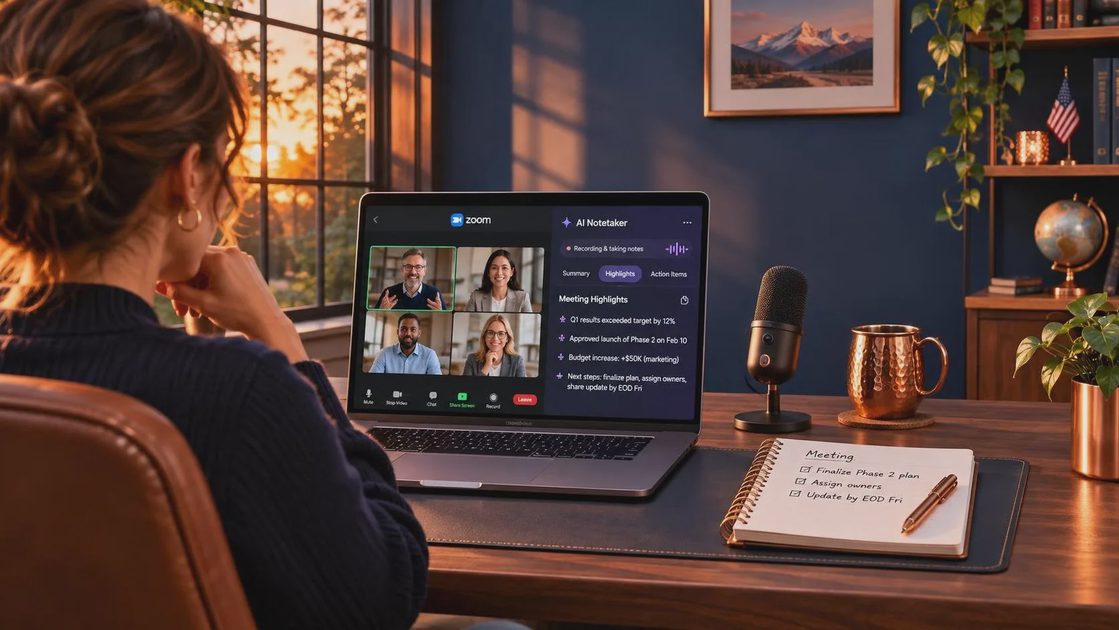
A good ai note taker for zoom meetings should join with minimal effort, identify speakers reasonably well, create a searchable transcript, and produce a concise summary. More importantly, it should separate decisions from discussion. “We talked about onboarding” is not a useful action item. “Maya will revise the onboarding email by Thursday” is useful because it includes an owner and a deadline.
Look for summaries that include decisions, open questions, action items, and notable context. Some platforms, including Zoom’s built-in AI Companion, Otter, Fireflies.ai, Fathom, and Read AI, approach this slightly differently. Zoom is convenient when your team already works inside Zoom. Otter is known for live transcription and searchable conversations. Fireflies.ai focuses heavily on integrations and meeting records. Fathom is popular with people who want quick summaries, particularly for sales or client conversations. Read AI adds meeting analytics and engagement-oriented reporting.
Those descriptions are starting points, not a reason to buy five subscriptions. A small team may get more value from the tool already included in its existing plan than from a separate app with more features and another login.
The real test: can you find the important part later?
The best ai note taker for zoom meetings is not necessarily the one with the most impressive demo. Test it against an ordinary call. Ask whether the transcript handles interruptions, names, acronyms, and people speaking from a noisy kitchen. Then check the summary after the meeting ends.
For a 45-minute project call, I want to find four things quickly: the decision we made, the work assigned to me, the unresolved issue, and the exact wording of anything that could create confusion later. If I have to reread 8,000 words to locate those details, the automation has simply moved the work from during the meeting to after it.
Speaker identification deserves special attention. AI often handles clear, turn-based conversation well and struggles when three people respond at once. Industry terms, customer names, and product codes can also come out wrong. A practical workflow includes a two-minute review before sharing notes. Correct “Atlas” when the transcript says “at last,” and verify every deadline. A polished error is still an error.
Privacy is part of the buying decision
Before using an ai note taker for zoom meetings, understand where audio and transcripts go, how long they are retained, and who can access them. A client call, employee conversation, performance discussion, or medical appointment can contain information you should not casually upload to a third-party service.
Check whether participants are notified, whether recording consent is handled clearly, and whether your company has rules about transcription. Zoom’s account settings, workplace policies, and local consent requirements can affect what is appropriate. Do not treat a tiny recording indicator as a complete privacy process.
For my own calls, I would create a simple rule: routine planning and project updates can be recorded when everyone knows; sensitive personnel, legal, financial, or family conversations should not be. If the meeting contains information you would not want copied into an email, the safest note may be a short manual summary written afterward.
A low-maintenance workflow that works
An ai note taker for zoom meetings becomes more useful when it has a defined job. Before the call, decide whether you need a transcript, a summary, or only action items. Start recording according to your team’s consent process. During the call, say decisions and assignments out loud instead of hoping software can infer them from vague conversation.
Afterward, spend five minutes reviewing the output. Delete irrelevant transcript clutter, correct names, and turn vague tasks into clear sentences. Then send a short follow-up in the place where work already happens, such as Asana, Todoist, Notion, Slack, or your project tracker. The meeting tool should feed the workflow, not replace it.
A useful format is simple: “Decision,” “Owner,” “Due date,” and “Open question.” You can paste the summary into an email or shared document without asking teammates to learn a new system. This is where the time savings become real. The software does the first pass, while a human spends just enough attention to prevent misunderstandings.

Which type of user benefits most?
An ai note taker for zoom meetings is especially useful for client-facing consultants, project managers, sales teams, recruiters, and anyone who regularly leaves a call thinking, “I know we discussed something important, but what was it?” It can also help people who process spoken information more slowly or need a reliable record while actively facilitating a meeting.
A freelancer might use Fathom or Otter to capture a client brief, then copy three approved deliverables into a project board. A small operations team might use Fireflies.ai to identify repeated handoff problems across weekly calls. A manager using Zoom every day might prefer Zoom’s native option because fewer moving parts often beat a slightly smarter standalone tool.
This is less useful for a ten-minute meeting with one clear decision, a conversation containing sensitive information, or a team that never reviews notes. If nobody reads the summary, better transcription will not repair the process. You may not need a better tool. You may need fewer meetings and a shared place for decisions.
A practical comparison before you subscribe
When comparing an ai note taker for zoom meetings, start with the problem you want solved. If the problem is forgetting follow-ups, prioritize action-item extraction and task integrations. If the problem is searching old conversations, prioritize transcript search and retention controls. If the problem is meeting overload, look for calendar organization and useful recurring summaries rather than flashy analytics.
Pricing often ranges from free limited plans to roughly $10 to $30 per user each month for paid individual or team tiers, with enterprise pricing handled separately. Free plans can be enough for occasional calls, but limits on transcription minutes, storage, integrations, or export options matter quickly. Run two comparable meetings through a trial and calculate the full cost, including review time and any cleanup.
My preferred test is deliberately boring: one internal planning call, one client-style conversation, and one meeting with interruptions. If the notes help me send a clear follow-up in five minutes, the tool earns another week. If I spend longer correcting it than I would have spent taking notes, I cancel it without guilt.
The Tuesday decision
An ai note taker for zoom meetings can be a genuinely helpful assistant, but only when it produces information you will use. Choose the simplest tool that fits your Zoom setup, privacy requirements, and existing project system. Give every meeting a purpose, review summaries briefly, and keep sensitive conversations out of automated recording when appropriate.
The goal is not to preserve every sentence. It is to make the next step obvious when your attention is somewhere else, perhaps halfway through dinner while Noah is looking for a soccer cleat and Cooper is carrying off a sock. Make it useful. Make it human. Make it survive Tuesday.



No comments yet — be the first to share a thought.